
Close Menu
  • Home
  • Reviews
    • Turntables
    • Cartridges
    • Phono Preamps
    • Speakers
    • Headphones
    • LP Albums
  • Guides
    • DIY Audio
    • Manuals
  • Best Of
  • About
What's Hot

Automatic vs Manual Turntable: Which Should You Buy?

21/11/2026

Why the Same Cartridge Can Sound Brighter on One Phono Stage Than Another

20/11/2026

How to Build Your First Hi-Fi System: Why Listening Time Beats Budget (An Audio T Case Study)

20/11/2026
Crackling SoundCrackling Sound
  • Home
  • Reviews
    • Turntables
    • Cartridges
    • Phono Preamps
    • Speakers
    • Headphones
    • LP Albums
  • Guides
    • DIY Audio
    • Manuals
  • Best Of
  • About
Home › Guides › How to Properly Set Up a Turntable: A Beginner’s Guide
Guides

How to Properly Set Up a Turntable: A Beginner’s Guide

Bruno BrozovicBy Bruno Brozovic27/09/2024Updated:02/11/2026No Comments6 Mins Read
Facebook Twitter Pinterest LinkedIn Tumblr Email
How To Set Up a Turntable
Share
Facebook Twitter LinkedIn Pinterest Email

Turntables are enjoying a resurgence in the world of music, and for good reason. Vinyl records offer a rich, warm sound that digital formats can’t quite replicate. However, to get the most out of your turntable, proper setup is essential. Whether you’re setting up your first turntable or simply need a refresher, this guide will walk you through the key steps to ensure an optimal listening experience.

Contents

Toggle
  • Unboxing Your Turntable and Initial Inspection
  • Choosing the Right Surface for Your Turntable
  • Assembling Your Turntable
    • Placing the Platter and Belt
    • Attaching the Counterweight
  • Calibrating Your Turntable
    • Balancing the Tonearm
    • Setting the Tracking Force
    • Adjusting the Anti-Skate Control
  • Connecting Your Turntable to the Audio System
    • Do You Need a Preamp?
    • Connecting to an Amplifier or Speakers
  • Fine-Tuning for Optimal Sound
    • Placement and Room Acoustics
    • Test Your Setup with a Vinyl Record
  • Maintenance and Best Practices
    • Cleaning Your Records and Stylus
    • Storing Your Records Properly
  • Troubleshooting Common Issues
    • Crackling Sounds and How to Fix Them
    • Skipping and Distortion
  • How To Set Up a Turntable – Detailed Video Instructions
  • Conclusion
    • What’s the best surface to place a turntable on?
    • How often should I clean my stylus and records?
    • Why does my turntable make a crackling noise?

Unboxing Your Turntable and Initial Inspection

Before diving into the setup process, carefully unbox your turntable and inspect all components. Turntables are delicate, and any missing or damaged parts could impact performance. Check for essential components such as the tonearm, platter, cartridge, counterweight, and dust cover.

Unboxing Your Turntable and Initial Inspection

Pro Tip: Keep the original packaging for future moves or repairs.

Choosing the Right Surface for Your Turntable

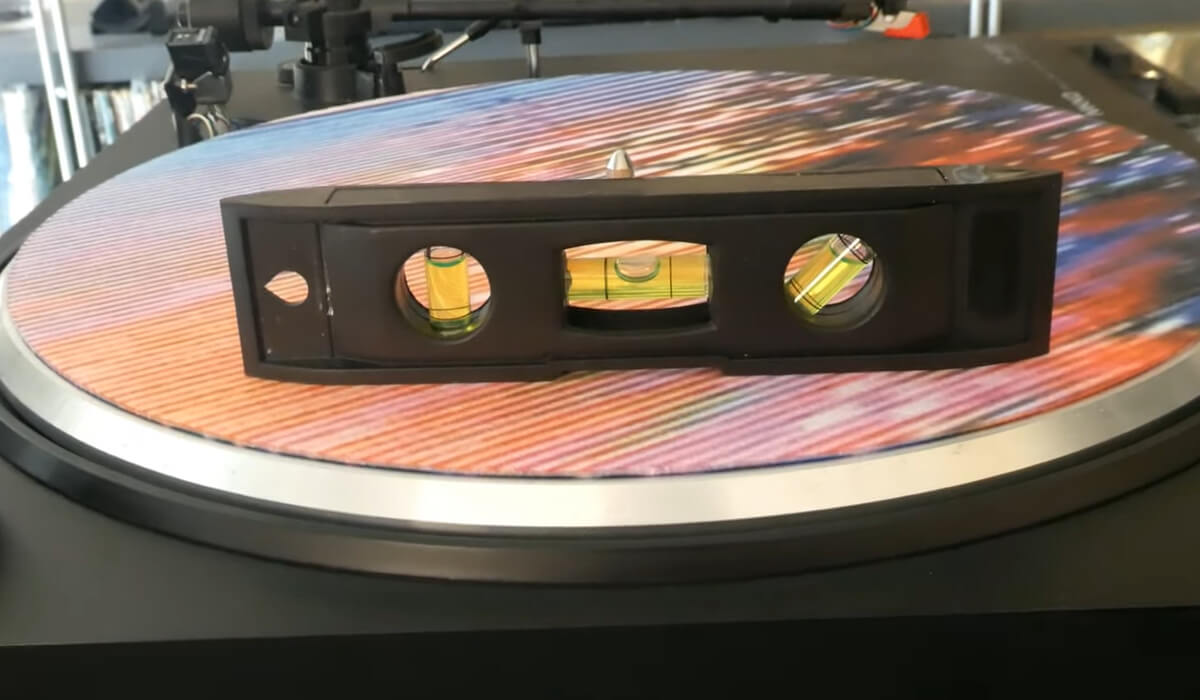
Your turntable should be placed on a stable, level surface. This is crucial because vibrations from uneven surfaces can distort the sound and cause the stylus to skip. A specialized audio rack or solid piece of furniture works best.

Choosing the Right Surface for Your Turntable

To ensure it’s level, use a small bubble level on the turntable’s platter. This will help avoid performance issues and maintain a clear sound during playback.

Assembling Your Turntable

Placing the Platter and Belt

Placing the Platter and Belt

If your turntable is belt-driven, start by placing the belt on the motor pulley and platter. For direct-drive turntables, the platter usually slots directly onto the spindle without a belt. Ensure it spins smoothly.

Attaching the Counterweight

The counterweight is a small but vital part of the tonearm setup. Gently screw the counterweight onto the back of the tonearm. This helps balance the tonearm to ensure the stylus makes proper contact with the record.

Calibrating Your Turntable

Balancing the Tonearm

To avoid damaging your records and stylus, the tonearm must be balanced. Start by setting the anti-skate to zero, then remove any counterweight. Adjust the weight until the tonearm floats parallel to the platter. Once the tonearm is floating, zero out the weight dial and set it to the recommended tracking force.
Read more about tonearm balancing in my article How To Balance a Tonearm.

Setting the Tracking Force

Each cartridge comes with a recommended tracking force, usually between 1.5 and 2.5 grams. Set the counterweight dial accordingly to ensure the stylus sits correctly in the record’s groove. This is crucial for both sound quality and record longevity.

Pro Tip: Invest in a tracking force gauge for precise calibration. It makes a world of difference.

Adjusting the Anti-Skate Control

The anti-skate setting prevents the tonearm from being pulled inward toward the center of the record. Set it to the same value as your tracking force to keep the stylus balanced within the grooves, which is key to avoiding skipping or sound distortion.

Connecting Your Turntable to the Audio System

Do You Need a Preamp?

Not all turntables need a separate preamp. If your turntable has a built-in preamp, you’ll see a switch labeled “Phono/Line” on the back. If there’s no preamp, you’ll need an external phono preamp to amplify the signal before it reaches your speakers or stereo receiver.

Connecting to an Amplifier or Speakers

Once your turntable is ready, it’s time to connect it to your audio system. If your turntable has RCA outputs, plug them into your preamp or amplifier. Don’t forget the ground wire — attach it to the grounding post on your preamp or amp to prevent hum.

Connecting to an Amplifier or Speakers

For those with powered speakers, you can connect the turntable directly to the speakers if it has a built-in preamp.

Fine-Tuning for Optimal Sound

Placement and Room Acoustics

Where you place your turntable and speakers can make a huge difference in sound quality. Keep your turntable away from sources of vibration (e.g., large speakers or heavy furniture). The ideal setup includes isolating the turntable on a separate, vibration-dampening surface to avoid interference.

Test Your Setup with a Vinyl Record

After connecting everything, it’s time to test your setup. Place a record on the platter and lower the tonearm using the cueing lever.

Turntable set up on a level, stable stand

Listen carefully for any skips, distortions, or hums. If any issues arise, revisit your tonearm balance, tracking force, and connections.

Maintenance and Best Practices

Cleaning Your Records and Stylus

Dirty records and styluses degrade sound quality. Use a carbon fiber brush to clean dust off your records before each play. Similarly, clean the stylus regularly with a specialized stylus brush. Avoid touching the grooves of your records, as oils from your hands can affect playback.

Storing Your Records Properly

Proper vinyl storage is essential to keeping your records in top shape. Always store them vertically, like books, to prevent warping. Keep them in their sleeves when not in use and avoid extreme temperatures or humidity.

Troubleshooting Common Issues

Crackling Sounds and How to Fix Them

Dust, dirty records, or static often cause crackling. Use an anti-static brush and clean your records to reduce crackling. If the problem persists, check your tonearm alignment and connections.

Skipping and Distortion

Skipping can be caused by an improperly balanced tonearm or incorrect tracking force. Recalibrate your tonearm and counterweight to fix this issue. Distortion could be a sign of a worn stylus, which may need replacing.

How To Set Up a Turntable – Detailed Video Instructions

Conclusion

Setting up a turntable may seem complex at first, but following these steps will ensure a smooth and rewarding experience. Whether you’re a vinyl enthusiast or a curious beginner, proper setup will unlock the rich, immersive sound that vinyl records are known for. With a bit of practice, your turntable will offer countless hours of high-quality music playback.

What’s the best surface to place a turntable on?

A solid, vibration-free surface is best. Use a bubble level to ensure it’s flat.

How often should I clean my stylus and records?

Clean your records before each play and your stylus weekly to maintain sound quality.

Why does my turntable make a crackling noise?

Crackling is typically caused by dust or static. Clean your records and stylus regularly.

How we prepared this article

This article was written by the Crackling Sound team following our editorial policy. Products are tested hands-on, specifications come from manufacturer documentation, and we update articles when things change.

  • Author: Bruno Brozovic
  • Last updated: November 2, 2026
  • Found a mistake? Write to us at info@cracklingsound.com.

Listening impressions are our opinion. Some links are affiliate links – they never influence our verdicts. Affiliate disclosure · Editorial team

Share. Facebook Twitter Pinterest LinkedIn Tumblr Email
Bruno Brozovic
  • Website
  • Facebook
  • Instagram

Bruno is a reviewer and audio enthusiast from Croatia. He has written many of the hands-on reviews of turntables, cartridges, phono preamps, speakers and headphones on Crackling Sound, drawing on years of listening to vinyl and building his own audio projects.

Related Posts

Automatic vs Manual Turntable: Which Should You Buy?

21/11/2026

Why the Same Cartridge Can Sound Brighter on One Phono Stage Than Another

20/11/2026

How to Build Your First Hi-Fi System: Why Listening Time Beats Budget (An Audio T Case Study)

20/11/2026
Add A Comment
ContentsToggle Table of ContentToggle
  • Unboxing Your Turntable and Initial Inspection
  • Choosing the Right Surface for Your Turntable
  • Assembling Your Turntable
    • Placing the Platter and Belt
    • Attaching the Counterweight
  • Calibrating Your Turntable
    • Balancing the Tonearm
    • Setting the Tracking Force
    • Adjusting the Anti-Skate Control
  • Connecting Your Turntable to the Audio System
    • Do You Need a Preamp?
    • Connecting to an Amplifier or Speakers
  • Fine-Tuning for Optimal Sound
    • Placement and Room Acoustics
    • Test Your Setup with a Vinyl Record
  • Maintenance and Best Practices
    • Cleaning Your Records and Stylus
    • Storing Your Records Properly
  • Troubleshooting Common Issues
    • Crackling Sounds and How to Fix Them
    • Skipping and Distortion
  • How To Set Up a Turntable – Detailed Video Instructions
  • Conclusion
    • What’s the best surface to place a turntable on?
    • How often should I clean my stylus and records?
    • Why does my turntable make a crackling noise?

Latest reviews

  • Automatic vs Manual Turntable - Illustrative image
    Automatic vs Manual Turntable: Which Should You Buy?
  • Cartridge Sound Brighter on Phono Stage
    Why the Same Cartridge Can Sound Brighter on One Phono Stage Than Another
  • Audio T Brighton
    How to Build Your First Hi-Fi System: Why Listening Time Beats Budget (An Audio T Case Study)
  • How to change an Audio-Technica stylus - Illustrative image
    How to Change the Stylus on an Audio-Technica Turntable
  • How to Align a Turntable Cartridge - Illustrative image
    How to Align a Turntable Cartridge: A Complete Guide

More from this topic

  • Automatic vs Manual Turntable: Which Should You Buy?
  • Why the Same Cartridge Can Sound Brighter on One Phono Stage Than Another
  • How to Build Your First Hi-Fi System: Why Listening Time Beats Budget (An Audio T Case Study)
  • How to Change the Stylus on an Audio-Technica Turntable
All Guides →

Crackling Sound

Independent reviews and guides for turntables, vinyl, speakers and headphones – written by people who listen to records every day.

Topics
  • Turntables
  • Cartridges
  • Phono Preamps
  • Speakers
  • Headphones
  • LP Albums
  • Guides
  • Best Of
The Listening Room
  • About us
  • Editorial team
  • Editorial policy
  • Affiliate disclosure
  • Disclaimer
  • Contact
Get Involved

Love vinyl and hi-fi? Write with us or join the team.

  • Join the team
  • Write for us
  • Manuals library
  • Audio events calendar
Privacy policy · Consent settings · Disclaimer© 2026 Crackling Sound. All rights reserved. As an Amazon Associate we earn from qualifying purchases. Operator: Sandeo s. r. o.

Type above and press Enter to search. Press Esc to cancel.

We use cookies to keep the site running, understand how it is used and – with your consent – for affiliate and marketing purposes. You can change your choice at any time via "Consent settings" in the footer.
You can change your cookie consent at any time.